Claude vs ChatGPT for Everyday Help
You keep hearing about Claude and ChatGPT. You’re not sure which one to try, and you don’t want to waste time on the wrong one.
I don’t think one is particularly better than the other, and you don’t need to pick one. I use Claude. I liked the way ChatGPT felt… but Claude fits better with the deep tech work and app-building I do. If you’re not building apps, ChatGPT might work better for you.
What these words mean
Vocab time. Each one in bold, then what it is, then why it matters.
LLM (large language model). The engine underneath the app that reads and writes text. Claude is the app; the LLM is the engine inside it. Same for ChatGPT. It only knows what’s in front of it right now, and it doesn’t remember you unless the app adds that. Full explainer: what LLM means and how it differs from AI.
Memory. What the app saves about you between chats, on its own. Sort of like sticky notes a helper keeps after each meeting. Both apps have it. You can usually read, edit and delete what’s saved.
Projects. A workspace you set up for one topic or body of work. Holds its own chats, files and instructions. Sort of like a labeled drawer: one job, one place. Both apps have them. The difference between memory and a Project: memory is what the app saves on its own. A Project is something you create and fill yourself.
Usage limit. Both apps measure your use in a five-hour window that resets on a timer. Sort of like a prepaid minutes bucket that refills. How fast you use it depends on what you ask for.
The catches
Let’s talk about the downsides before we get into the nitty-gritty.
-
Both can be wrong. These are machines and they can and will state things wrong, very confidently. We are not out here pretending either has all the answers. Fact-check anything before you use it.
-
Both can use your chats to train future models (the company learns from what you type), depending on a setting. The privacy section right below shows where the toggle is. I’m not here to tell you how to feel about that. This blog is here to give you the information.
-
ChatGPT Free shows ads in some countries (US, UK, Australia, New Zealand and Canada at the last check)3. Anthropic says Claude will remain ad-free13.
-
Prices and limits change. Every source in the list at the bottom has the date I last checked it. Check the live pages yourself, because comparison articles age fast. This one included. If I got something wrong, reach out and I’ll update it. I am one person and I am trying my darn best.
Your privacy settings
Where each toggle lives and what it does. Because “what happens to the things I type” is the question most comparison articles skip.
What training means here. When you allow training, the company can use your chats to teach its future models. When you don’t, your chats are still stored for a while (for safety and abuse checks), but they’re not used to build the next version.
That’s what they say… take it with a grain of salt. Don’t give either tool information you wouldn’t say to someone in public. No bank info, no medical info. I’ve never told Claude my real name. We’re not friends… and they don’t need that information.
Claude.
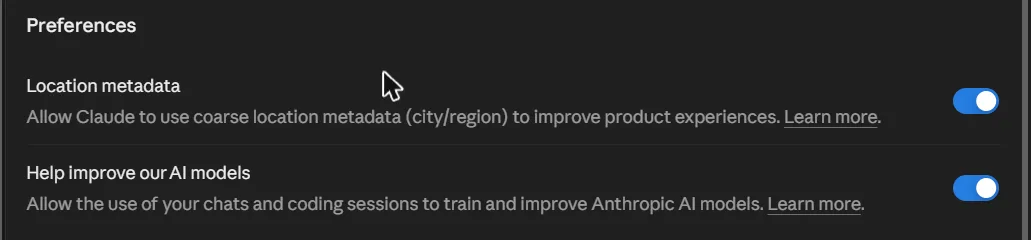
- The toggle: Settings, Privacy, Preferences, then “Help improve our AI models” (checked in the app 2026-10-29).
- Allow it: chats can train future models, kept up to five years. Don’t allow it: your chats aren’t used for training, and chats you delete are removed within 30 days5.
- New users choose at signup. Turning it off later doesn’t undo training that already happened5.
ChatGPT.
- The toggle: Settings, then Data controls, then “Improve the model for everyone”4.
- OpenAI may use conversations to improve its models. You can opt out4. Project content trains if that setting is on1.
- Temporary Chat skips memory and ads3.

Which one writes better?
It depends on the job and on your taste.
What one independent test found. Not run by me. A content marketer at G2 used both free plans for 30 days with identical prompts10:
- On an informal essay, Claude was more conversational. ChatGPT set up the topic better but blander. He called it a tie.
- On a funny dialogue rewrite, Claude did better. Could nearly work as a skit.
- ChatGPT repeats the same structure until you tell it not to.
- He ended with “no single winner.”
same input, only fair test
That’s one person, one month, free plans only. Results change with every update. The useful part isn’t his verdict. It’s the method.
I don’t think you should use any LLM to write essays or anything creative. Short captions, fine. These are tools, meant to free us up for the creative work. I do use Claude to reformat my writing: dictation to vomit words onto a Word document, then reorganize into something readable. Is that letting Claude write things… Up to you, the reader, to decide.
Neither tool is useful until you teach it how you talk.
What they cost
Free plans. Both have one, and each is good enough to test.
- ChatGPT Free: web search, data analysis, file uploads, image creation and custom GPTs. Each tool has its own limit within a five-hour window2.
- Claude Free: also a five-hour window. No fixed message count; it depends on length, files and features7.
Paid plans.
- ChatGPT Plus: $20/month4. Other tiers exist: Go is $8/month in the US, and Pro starts at $100 with $200 and $500 tiers14 (prices checked 2026-10-29).
- Claude Pro: $20/month, or $17/month on annual billing. Max starts at $100/month15 (prices checked 2026-10-29). On Pro, how far your limit goes depends on chat length, files and which model you use8.
I’ll be honest: I pay for the $100/month Claude tier. I use it a lot for coding and building. You probably don’t need that, but I want to be upfront so you know where my perspective comes from.
Two paid plans at $20 each is $40/month. That’s real money for a solo creator. Start free. If you can’t decide, pay for one for a month and the other the next. Both are a tax write-off if you use them for work.
How they remember your notes
Can it remember your brand voice and what you sell?
Memory.
- Claude: optional. You can view and edit every entry in Settings. Each Project keeps a separate memory, so one Project’s details don’t leak into another9.
- ChatGPT: you choose between “default” memory (all your chats) and “project-only” memory (that Project’s chats only). You can’t see a list of project memories. To remove something, delete or move the chat1, 12.
Projects.
- Both apps have them. Each keeps chats, files and instructions together.
- ChatGPT: files per Project are capped: 5 on Free, 25 on Plus, 40 on Pro1. Project instructions override your global instructions inside that Project.
- Claude: Projects hold custom instructions and files. I couldn’t confirm Claude’s Free file cap, so check its pricing page.
A small example. A “My brand voice” Project holding a short about-me, five of your best captions, and a list of words you never use. Every new chat inside it starts with that context. I keep separate Projects for different jobs, each with its own instructions and files. Keeps everything from bleeding together.
What else each one can do
Pictures.
- ChatGPT can create and edit images, even on Free2, 11.
- Claude doesn’t make images. It can build diagrams and interactive visuals inside a chat, and can read images you upload6.
I don’t support generative AI for images, and I’m not going to pretend otherwise. But I’m not here to tell you what to do. ChatGPT can make decent flyers that don’t look like the usual AI slop. If that’s useful to you, that’s your business.
Everything else. Both can search the web and upload files to the Project workspace. ChatGPT also has voice mode and custom GPTs. I find the voice mode off-putting and a little… weird2, 4.
Is Claude or ChatGPT better, or do you pick both?
Why not both? The cheap way to decide is the same-task test from earlier.
I haven’t used ChatGPT in six months, so I’ll be straight about that. It could be great now… Depends on how your brain works and what you need.
The better tool is whichever fits the job and your budget this month.Where to start
Never tried either? Open both for free, give them the same job, see which one you edit less.
Already pay for one? Try the other for free first. You might keep both.
Worried about privacy? Check your toggles today. Don’t give them anything you wouldn’t say in public.
That ten-minute test is worth more than any comparison article. This one included. Tell me which one won for your work.
Sources
- OpenAI Help Center, “Projects in ChatGPT,” https://intercom.help/openai/en/articles/10169521-projects-in-chatgpt (opened 2026-10-28)
- OpenAI Help Center, “ChatGPT Free Tier FAQ,” https://help.openai.com/en/articles/9275245-chatgpt-free-tier-faq (opened 2026-10-28)
- OpenAI Help Center, “Ads in ChatGPT,” https://help-lb.openai.com/en/articles/20001047 (opened 2026-10-28)
- OpenAI Help Center, “What is ChatGPT Plus?” https://help.openai.com/en/articles/6950777-what-is-chatgpt-plus (opened 2026-10-28)
- Anthropic, “Updates to Consumer Terms and Privacy Policy,” https://www.anthropic.com/news/updates-to-our-consumer-terms (opened 2026-10-28, re-confirmed 2026-10-29)
- Claude Help Center, “Can Claude produce images?” https://support.claude.com/en/articles/9002504-can-claude-produce-images (opened 2026-10-28)
- Claude Help Center, “About Claude’s Pro Plan Usage,” https://support.claude.com/en/articles/8324991-about-claude-s-pro-plan-usage (opened 2026-10-28)
- Claude Help Center, “Understanding usage and length limits,” https://support.claude.com/en/articles/11647753-understanding-usage-and-length-limits (opened 2026-10-28)
- Claude, “Bringing memory to Claude,” https://claude.com/resources/articles/memory (opened 2026-10-28)
- Sagar Joshi, “Claude vs. ChatGPT: What I Found After 30 Days of Use,” G2 Learn, https://learn.g2.com/claude-vs-chatgpt (opened 2026-10-28)
- Igor Bonifacic, “How to generate AI images using ChatGPT,” Engadget, https://www.engadget.com/ai/how-to-generate-ai-images-using-chatgpt-120000560.html (opened 2026-10-28)
- Graham Barlow, “ChatGPT Project-only memory is live,” TechRadar, https://www.techradar.com/ai-platforms-assistants/chatgpt/chatgpt-project-only-memory-is-live-and-it-might-change-how-you-work-with-ai (opened 2026-10-28; older article, 2025-08-26)
- Anthropic, “Claude is a space to think,” https://www.anthropic.com/news/claude-is-a-space-to-think (official, 2026-02-04, opened 2026-10-29)
- OpenAI, ChatGPT pricing, https://learn.chatgpt.com/docs/pricing (official, opened 2026-10-29; Pro tier prices may be changing)
- Anthropic, Claude plans and pricing, https://claude.com/pricing (official, opened 2026-10-29)