
What Is a Second Brain? (And Do Creators Actually Need One?)
Your prices are in a text thread. Your ideas are in a notes app. That one decision you made last month is buried in an email you can’t find. Every time you need something, you dig.

That’s the problem a second brain is supposed to fix. This post covers what a second brain is, what goes in one, the honest downsides, and a way to try one without building a big system first.
What these words mean
Three terms, so the rest of the post can use them freely.
Second brain. A notes system for saving what you know and finding it again. The phrase got popular through Tiago Forte, a productivity writer whose book is called Building a Second Brain. The idea is older than his book. A German sociologist named Niklas Luhmann kept a box of linked paper slips and treated it like a thinking partner. The habit underneath is the same: keep useful things where future you can find them.
Cognitive offloading. Psychologists’ name for using something outside your head to lighten the load. A shopping list counts. A phone reminder counts. You already do this. This is mostly just a fancy term for getting it out of your brain and written down somewhere. A second brain is doing it on purpose, in one place.
Does a second brain work? It depends.
Now I can’t tell you how many organization systems I’ve used in my life. My raging ADHD has caused me to build, use, and abandon almost every single one of them. If you’ve ever found yourself thinking, “Ah this notebook is going to change my life,” then this article might be for you. Now I’m not going to sit here and tell you that a second brain is going to change your life. That’d be silly but I do think it may help you out just a little bit.
It depends on one thing: whether you open it.
Here’s what the smart people say.
- One writer, Joan Westenberg, deleted an elaborate note system. As another writer quotes her, she realized she had created “a new problem: deferral.” The bigger the system grew, the more thinking she pushed onto a future self who never arrived.
- Akhil Unnikrishnan spent about six years building one, and describes linked notes that mostly sat unused and an archive of forgotten material.
- Even Forte writes that a lot of organizing is procrastination in disguise.
- Jorge Arango, who wrote a book on these systems, likes them but dislikes the name. It suggests handing your thinking to a system. He pictures a garden instead: a place where you do your thinking, not a thing that thinks for you.
A messy version counts. I keep mine in a vault, which is Obsidian’s word for the folder where it stores your notes (Obsidian is the note app I use). It’s a bit messier than any of these suggest, but that works with my brain. A messy version that you use is better than the cleanest, nicest setup that you don’t. Mine looks a lot like my actual brain. There are too many folders, but I’ve taught myself to open it and put things where they need to go. I also use it with AI, but that’s another post.
What actually goes in one?
Forte’s method is a four-step habit called CODE, for Capture, Organize, Distill, Express. In plain words: save the good stuff, put it near the work it helps, boil it down to what matters, then use it to make something. But the letters don’t really matter. The actual habit does.
For a creator, here’s what that could look like. This list is a suggestion, not from a source.
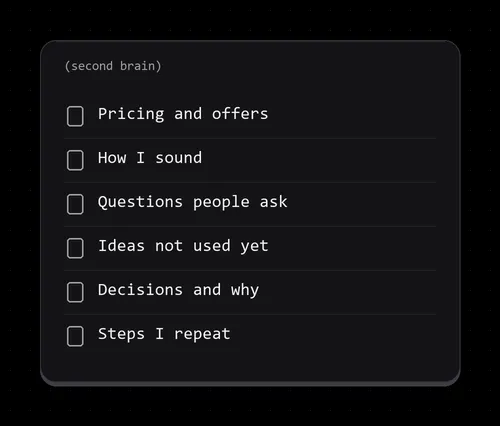
- Pricing and offers. What you charge, what’s included, what you say when someone haggles.
- How you write and sound. Words you like, words you avoid, a few example posts you’re proud of.
- Questions people keep asking, with your best answer written once.
- Ideas you haven’t used yet, with one line on why each caught your attention.
- Decisions and why. “I stopped doing X because…” saves you from re-arguing it with yourself.
- Steps you repeat. How you post, how you deliver an order, how you back things up.
Example: you read a thread about how to price a custom video. Instead of liking it and losing it, you save the two lines that matter, plus a note on why, inside your pricing file. Next time someone asks your rate, the answer is already there.
What to leave out. If you can’t name the job a note will help with, it probably doesn’t need saving. One person who saved everything for six years describes an archive of forgotten material. The point is keeping what’s useful, not keeping everything.
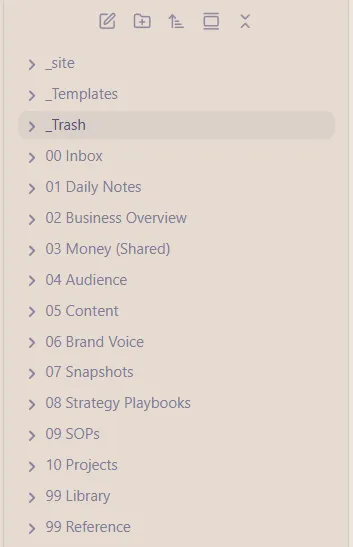
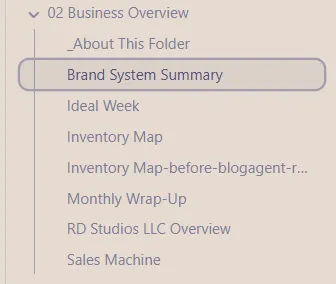
Now my vault has grown, arguably probably too big. I’m here to give you information, probably not to be followed by example but here is a screenshot of what my actual vault looks like.
How to organize it
Now you can read many articles on the best way to organize things but in all actuality your brain is the only one that knows how it needs to read information. If you look above you can see how I organize things but that may make no sense to you. I myself do not follow either of the main organizational paradigms that are often explained. Simply because my brain doesn’t work that way. I will, however, give you a few examples should you need to get started. And from there you can use your brain to get more comfortable with it.
In fact when I started writing this article, I realized that I do not, in fact, follow any of the practical organization tips that most of the experts give you. So what are you going to do?
Okay from here, I want to give you a few examples of organization practices so you can choose for yourself. If there are other organization ways to do things, I don’t want to tell people how to organize. I just want to give them some organizational suggestions because here’s the thing: most of my readers are probably going to be autistic and ADHD and they’re going to have to figure out what works for them.
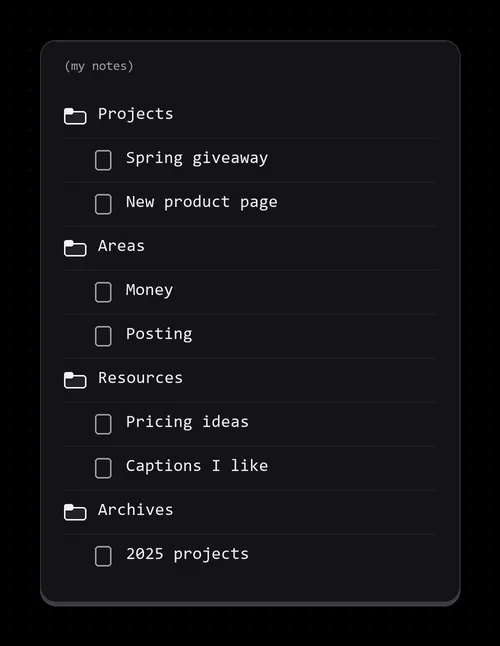
One popular example is PARA, from Forte Labs. It stands for Projects, Areas, Resources and Archives: a folder for things you’re finishing, one for ongoing responsibilities, one for topics you’re learning about, and one for what’s done.
Keep it simple. A system should give you time, not take it. More folders is not better.
Other examples.
- Topic folders. Sort by what you make or sell. Simpler, and what most people already do. The catch is the one Forte points at: you end up hunting across folders when you’re mid-project. Use this if you rarely run big multi-step projects and mostly want to find things by subject.
- One idea per note, linked together. Luhmann’s slip-box style. It suits writers and researchers more than people shipping projects. Not a beginner starting point.
Do you need a special app?
No. Forte’s own site says the method works with any tool and lists apps his students use, including Evernote, Notion, OneNote, Apple Notes, Roam, Obsidian, Bear and Google Keep. Luhmann did it on paper. A folder of text files or one notes page is enough to start.
One warning: the app can become the project. Standard Notes says some people put more effort into tending their system than using it. Fair warning: if you’re anything like me an app can become a project. When I first began exploring Notion, I spent many many hours trying to make my Notion absolutely perfect and it was a real problem. One app maker advises picking one tool and sticking with it for six months. That number is one company’s advice, not a study.
The best app for a second brain is the one you already open.
Where to start
If you’ve tried this before and it fell apart: it was probably too big. The smart people say the same. Start over with one project, not the whole system.
If you already keep notes and love it: ask whether you use what you save or mainly save. The smart people’s stories are about the second version.
If you try it, I’d like to hear what you put in yours.
If you want a second brain that works with AI, where Claude reads your notes so you don’t explain things twice, that’s coming next.
TL;DR
Sources
- Building a Second Brain, “official home page,” https://www.buildingasecondbrain.com/ (company site; opened 2026-10-31). Forte’s own company, which sells the book and courses; includes testimonials.
- Atlas, “How to Build a Second Brain That Actually Works for You,” https://www.atlasworkspace.ai/blog/how-to-build-a-second-brain (app maker; opened 2026-10-31). Used for its plain definition, the CODE words and general advice.
- Andy Matuschak, “Zettelkasten,” https://notes.andymatuschak.org/Zettelkasten (independent working notes; opened 2026-10-31).
- University of Waterloo School of Psychology, “Evan Risko on how technology affects the way we think,” https://uwaterloo.ca/psychology/news/evan-risko-how-technology-affects-way-we-think (independent news piece, 2016; opened 2026-10-31). About a review on cognitive offloading.
- Forte Labs, “The PARA Method,” https://fortelabs.com/blog/para/ (company site; opened 2026-10-31). Forte’s own company, which sells the book and courses.
- Jorge Arango, “Robots in the garden,” https://jarango.com/2026/03/27/robots-in-the-garden/ (independent blog, Mar 27, 2026; opened 2026-10-31). Quotes Westenberg.
- Akhil Unnikrishnan, “A second brain was never really feasible,” https://akhiluk.bearblog.dev/2025/07/a-second-brain-was-never-really-feasible/ (independent personal blog, 2025; page returned an error when opened 2026-10-31). Summarized from search results only.
- Obsidian Help, “Create a vault,” https://obsidian.md/help/Getting+started/Create+a+vault (app maker; opened 2026-10-31).
- Standard Notes, “New Wave: Second Brain Note-Taking,” https://standardnotes.com/blog/new-wave-second-brain-note-taking (note-app maker, Dec 19, 2022; opened 2026-10-31). Has its own angle.